
Your second brain, kept tidy
Everything worth keeping,
in one
beautiful
place.
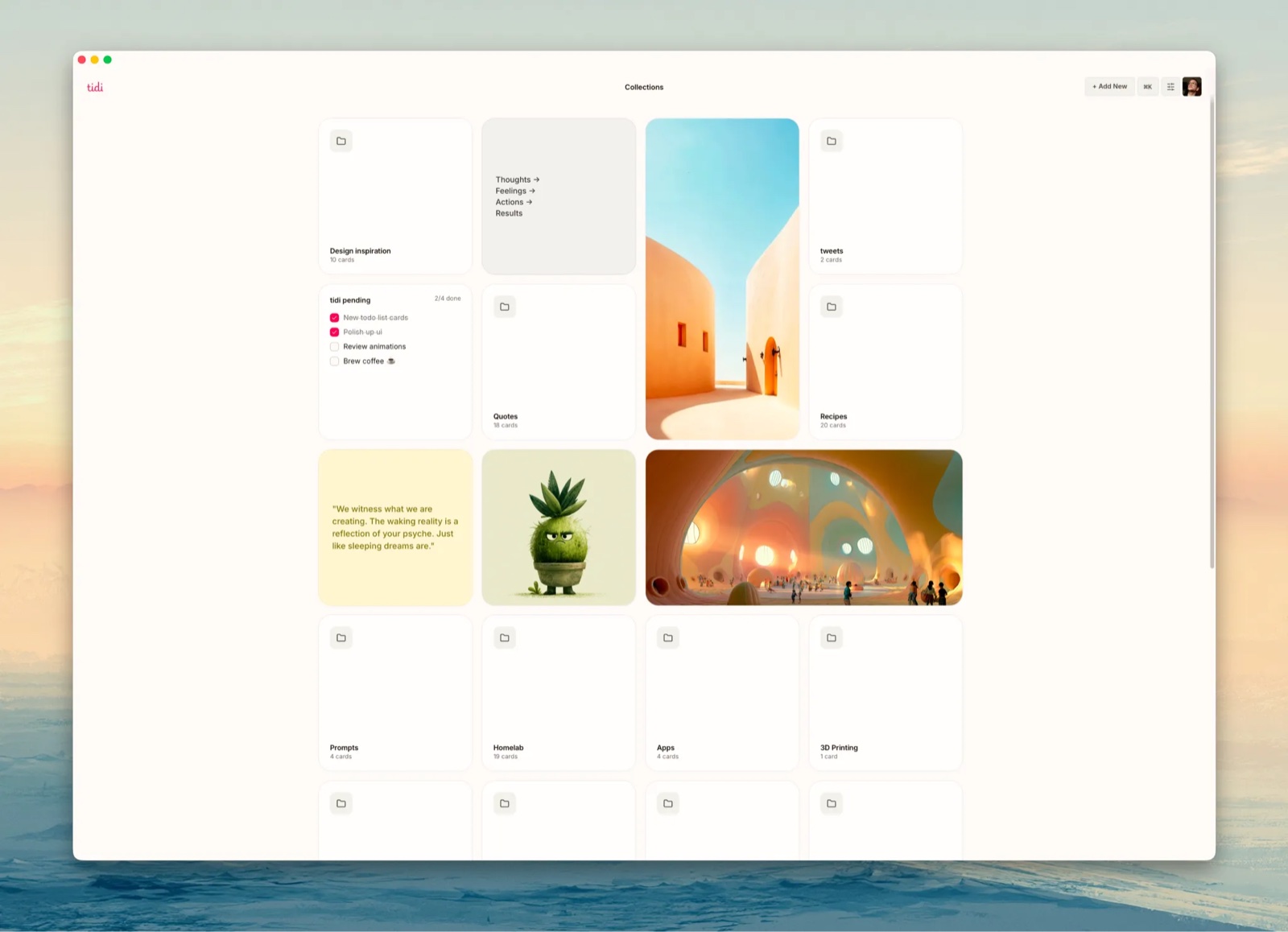
tidi is where you keep the things you'll want again: notes, images, links, todos. Save it in a second, find it neatly arranged when you come back.
Opening soon · no card, no spam
Why tidi exists
Saved-and-forgotten is just losing things slowly.
You saved it because it mattered, and now it's scattered across five apps that never talk to each other. tidi is one calm home for all of it: neatly organized, still there when you come back. No feed, no metrics, no algorithm. Just your stuff, where you left it.
Screenshots lost in the camera roll
In tidi they land on a canvas, captioned automatically, next to the idea they belong to.
Bookmarks you never open again
Links unfurl into visual cards you actually see, not another line in a list you scroll past.
Notes scattered across five apps
Stickies, notes, links, and todos live side by side on one surface, not in five silos.
"I know I saved it somewhere"
tidi reads the text and colors inside your images. Search by what you remember.
Todos in yet another app
Little lists live as cards next to the project they belong to. Check things off where the work is.
A feed that wants your attention
Not here. No algorithm, no infinite scroll. Your stuff waits quietly until you come for it.
How it works
Save it. Place it. Find it.
01
Paste anything
A link unfurls into a card. An image lands where you drop it. A thought becomes a sticky. If you're not sure where it goes, the inbox catches it.
02
It stays tidy on its own
Cards snap to an invisible grid, so the canvas always looks composed. Group things into folders and collections, or leave them out where you can see them.
03
Find it again
Every image gets a caption, its colors, and its text read automatically on upload. Search by what you remember: a word, a color, a vibe.
What's on the canvas
A card for everything you keep.
Stickies, notes & quotes
Quick thoughts as stickies, longer thinking as notes, lines worth keeping as quote cards. Every size a thought comes in.
Images
Drop them anywhere. Each one gets a caption, its palette, and its text read on upload. Flip the card for the details.
Checklists
Little todo cards that live next to the project they belong to. Check things off where the work is.
Video & links
Links unfurl with a preview. YouTube, tweets, Figma frames, and CodePen render live on the canvas, not as dead URLs.
Full markdown support
Notes speak markdown: headings, bold, lists, quotes, checkboxes. Paste it raw, read it beautiful.
Private share links
Everything is private until you mint a link. Share one card or a whole canvas; revoke it anytime.
The added bonus
Oh, and your AI can use it too.
tidi is a place for your things first, not an AI product. But if you use Claude or another assistant, it comes with MCP built in: your agent can read any card by URL, save links for you, or drop a screenshot straight into your inbox. Nice to have, never in the way.
- Any card readable by your agent, as markdown
- Save from anywhere via API or MCP, with your personal token
- No chatbot in the app; your AI stays where it lives
"claude, save that cabin video
to my inbox"
via MCP · POST /api/v1/cards
Private by default
A quiet corner of the internet.
Your canvas is yours alone until you share a link. There's nothing here designed to hold your attention, because the whole point is to give it back.
No feed. No likes. No streaks. No ads. Hover to hush the noise →
Use cases
For visual minds of every kind.
Designers
Moodboards that stay alive. Save screenshots, dribbble shots, and type specimens; tidi pulls the palettes and reads the text inside them.
Writers
A wall for the piece you're circling. Quotes, links, and fragments spread out where you can see the shape of the argument.
Researchers
Collect sources as cards, arrange them into an argument, and let your AI read the whole canvas when it's time to synthesize.
Builders
Product ideas, competitor screenshots, embedded Figma frames and CodePens. The whole project on one surface, addressable by URL.
Pricing
One plan. Everything in it.
No tiers to compare, no features held hostage. This is the price when tidi opens; waitlist members get the first invites.
tidi · the only plan
$9/month
or $90/year, two months free · about two coffees
- Unlimited canvases and cards
- Auto-captions, palettes, and text extraction
- Full API + MCP access for your AI
- Shareable links for cards and canvases
Free while we're in early access
Questions, answered.
What can I save to tidi? +
Links, images, videos, notes, stickies, and web clips. Links unfurl with a preview, images get captioned and color-extracted on upload, and embeds like YouTube, tweets, and Figma frames stay live on the canvas.
How is tidi different from mymind? +
Same job: a private place for everything you save. Different shape: mymind is a feed you scroll, tidi is a canvas where things have a place. Your saves stay visible and arranged instead of sinking down a timeline. And if you use an AI assistant, tidi connects to it out of the box.
How does the AI integration actually work? +
Every card and canvas has a URL that returns clean markdown, so any agent can read it. Writing works through the REST API or the MCP server with your personal token. Connect Claude once and it can save links, drop images in your inbox, or build a canvas for you.
Is my canvas private? +
Yes. Everything is private until you explicitly share a link, and a shared link exposes only that card or canvas. No ads, no tracking, and your data is never sold or used to train anyone's models.
Does it work on mobile? +
tidi is web-native and works in any browser today; a mobile capture flow is on the roadmap. Desktop is where the canvas shines: mobile is for saving, desktop is for thinking.
When does tidi open? +
We're letting people in a batch at a time so we can keep things calm and fix what breaks. Join the waitlist and you'll get an invite by email; no card needed to try it.
Start with one messy thought.
The canvas takes it from there.
Opening soon · no card, no spam